

Add To Cart
Product

Farming requires timely decisions, and buying the right agricultural products at the right time is crucial for protecting your crops and ensuring a healthy harvest. In the past, purchasing crop protection items meant taking time out of your busy day to travel to the nearest market. Today, smartphones have made this process much easier.
With a smartphone and an internet connection, you can browse and order exactly what your farm needs from the comfort of your home. If you are looking for a reliable way to access the Safal Krishi Direct agricultural e-commerce platform, the official Safal Krishi Direct App is your best solution.
This guide is designed specifically for Indian farmers and rural smartphone users. Whether you are highly experienced with smartphones or installing an application for the very first time, this article will teach you exactly how to find, download, and install the Safal Krishi Direct App safely on your Android mobile phone.
The Safal Krishi Direct App is the official mobile application of Safal Krishi Direct, a dedicated agricultural e-commerce platform. Designed with farmers and agricultural buyers in mind, this farming products app brings a digital store directly to your mobile phone screen.
Instead of opening a web browser every time you need to look for farming supplies, the Safal Krishi Direct Android app provides a quick, user-friendly shortcut. Depending on the current version of the app, users can typically browse various categories of crop protection products, read detailed product descriptions, and conveniently place orders. It acts as a reliable pesticide shopping app for small and medium-scale farmers who want straightforward access to the agricultural inputs they need.
When you want to download the Safal Krishi Direct app, the most important rule is to prioritize the safety of your smartphone. Android users should always use the official Google Play Store to download applications.
You should never try to perform a Safal Krishi Direct app download from unknown or third-party websites offering “APK” files. Downloading files from unverified websites can expose your mobile phone to viruses or security risks.
To keep your phone and your personal information safe, simply use the Google Play Store already installed on your Android device. By searching for the official Safal Krishi Direct Google Play Store listing, you ensure that you are getting the genuine, secure version of the app.
Installing a new app might seem complicated if you have never done it before, but it is actually a very quick and simple process. Follow these clear, step-by-step instructions to successfully install the Safal Krishi Direct app download for Android.
Unlock your Android smartphone and go to your home screen or app menu. Look for an app called “Play Store” or “Google Play Store.” The icon usually looks like a colourful triangle (featuring green, blue, red, and yellow). Tap on this icon to open the store.
Once the Google Play Store is open, look at the top of your screen. You will see a search bar that says “Search for apps & games.” Tap inside this search bar. Your phone’s keyboard will appear. Carefully type Safal Krishi Direct and tap the magnifying glass icon (or the Enter key) on your keyboard to start the search.
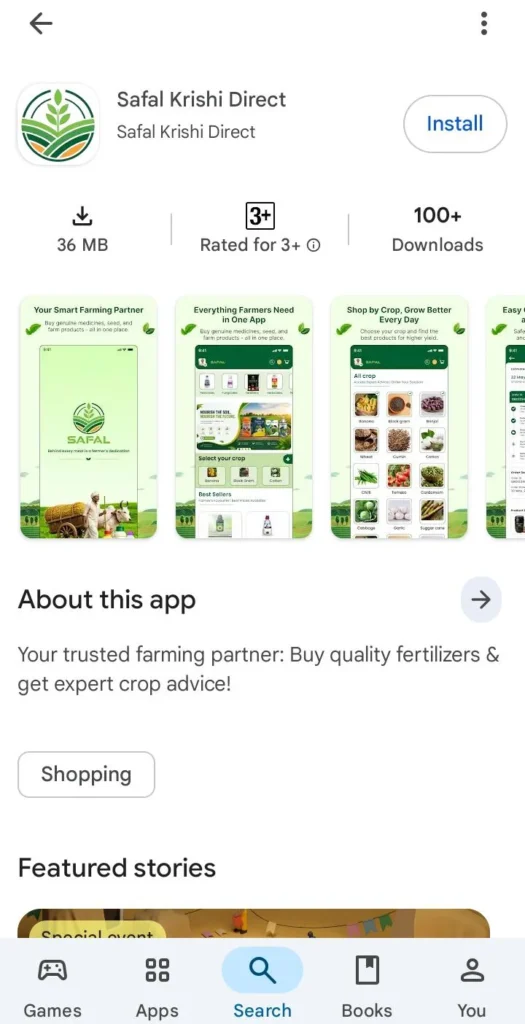
A list of search results will appear on your screen. Look for the application named “Safal Krishi Direct.” Check the app logo and the developer’s name to ensure it is the official agricultural app for farmers. Tap on the app’s name or logo to open its full detail page.
On the app’s detail page, you will see a prominent button, usually green or blue, that says “Install.” Tap this button once. The Google Play Store will begin to download and install the Safal Krishi Direct app onto your phone automatically. You will see a progress circle showing you how much of the app has been downloaded. Wait patiently for this process to finish.
Once the installation is 100% complete, the “Install” button will change to say “Open.” You can tap this “Open” button immediately to launch the app. Alternatively, you can close the Play Store and look for the new Safal Krishi Direct icon on your phone’s home screen or app menu, then tap it to start.
When you open the app for the first time, you may be greeted by a welcome screen. To use the e-commerce features, you will likely need to register a new account or log into an existing one. Depending on the app’s current setup, you may be asked to enter your mobile number, receive a One-Time Password (OTP) via SMS, and enter basic details like your name and delivery address. Follow the on-screen instructions to complete your setup.
After successfully completing the installation and logging into your account, you can start exploring the platform. Here is how you can generally use the app for your daily farming needs:
Having a dedicated agricultural app on your smartphone offers several practical advantages for busy farmers:
Sometimes, technology does not work perfectly on the first try. If you are struggling to install the Safal Krishi Direct app, here are a few common problems and how to easily fix them.
If you type the name into the Play Store but cannot find the app, double-check your spelling. Make sure you typed “Safal Krishi Direct” correctly. Also, ensure your smartphone’s operating system is up to date, as very old Android versions might not display newer apps.
If you tap the “Install” button but nothing happens, the most common issue is a poor internet connection. Check if your Wi-Fi or mobile data is turned on and working properly. Another reason could be a lack of storage space. Check your phone’s settings to ensure you have enough free memory. If your phone is full, delete old videos, photos, or unused apps, and then try again.
If the download starts but gets stuck at a certain percentage (for example, at 99%), pause the download and resume it. If it remains stuck, restart your mobile phone, open the Google Play Store again, and restart the download process.
If you successfully download the Safal Krishi Direct app but it closes immediately when you try to open it, try restarting your smartphone. If the problem continues, go back to the Google Play Store, check if there is an “Update” button, and tap it. As a final solution, you can uninstall the app and reinstall it again directly from the official Play Store.
How do I download the Safal Krishi Direct App?
To download the app, unlock your Android phone, open the Google Play Store, and search for “Safal Krishi Direct.” Tap on the official app listing in the search results and press the “Install” button to download it to your device safely.
Is Safal Krishi Direct App available on Android?
Yes, the Safal Krishi Direct Android app is fully available for smartphone users. It has been built to help farmers and agricultural buyers easily browse and shop for farming products directly from their Android mobile devices.
Where can I install the Safal Krishi Direct App?
You should always install the Safal Krishi Direct app from the official Google Play Store. We highly recommend avoiding third-party websites or unknown sources, as downloading apps from the Play Store guarantees you get the secure, official version.
Is the Safal Krishi Direct App free to install?
Yes, downloading and installing the Safal Krishi Direct app from the Google Play Store is completely free. You only pay for the agricultural products and crop protection items that you choose to order through the platform.
Why can’t I install the Safal Krishi Direct App?
If you cannot install the app, you may be experiencing a poor internet connection or a lack of storage space on your smartphone. Verify that your mobile data is working, free up some storage space by deleting unneeded files, and try the installation again.
How do I update the Safal Krishi Direct App?
To update the app, open the Google Play Store, tap your profile icon at the top right, and select “Manage apps & device.” Find Safal Krishi Direct in your list of apps. If a newer version is available, tap the “Update” button next to it.
Can I order agricultural products through the app?
Yes, the Safal Krishi Direct app functions as a dedicated pesticide shopping app and agricultural e-commerce platform. Depending on the app’s features and your location, you can browse various products, add them to your cart, and place orders directly.
Is it safe to download the Safal Krishi Direct App?
Yes, it is entirely safe to download the app, provided you do so through the official Safal Krishi Direct Google Play Store listing. Always rely on the official Android store to protect your device from potential security risks.
Transitioning to digital solutions can greatly benefit your farming operations by saving you valuable time and effort. The Safal Krishi Direct App is an excellent tool that places a wide variety of crop protection products and farming essentials right into the palm of your hand.
By following the simple steps provided in this guide, you can easily install the app on your Android smartphone today. Remember to always use the official Google Play Store for a safe and secure download.
Ready to make your agricultural shopping easier? Open the Google Play Store on your mobile phone, search for Safal Krishi Direct, install the official app, and start exploring high-quality agricultural products today!
Farming requires timely decisions, and buying the right agricultural products…

Introduction: Modern Crop Protection in Indian Agriculture Insect pests remain…
Your cart is currently empty!
Notifications